





WSL上でDockerコマンドが使えない!前は確かに使えていたのになと思ったときに見るべき箇所をメモがてら残しておきます。
以下のように出力されてちゃんと「Dockerデスクトップ設定でWSL統合をアクティブ化することをお勧めします。」って言ってくれていますね。
[code lang=”shell”]
$ development/php$ docker
The command ‘docker’ could not be found in this WSL 2 distro.
We recommend to activate the WSL integration in Docker Desktop settings.
See https://docs.docker.com/docker-for-windows/wsl/ for details.
[/code]
なのでDockerDesktopを開き
[Setting(歯車のマーク)]->[Resource]->[WSL INTEGRATION]の順に開きます。
たぶんその時
[Enable integration with my deault WSL distro]にチェックが入っていないか、
使用したいWSL[Enable integration with additional distor]のボタンがオンっぽくなっていないかのいずれかと思います。
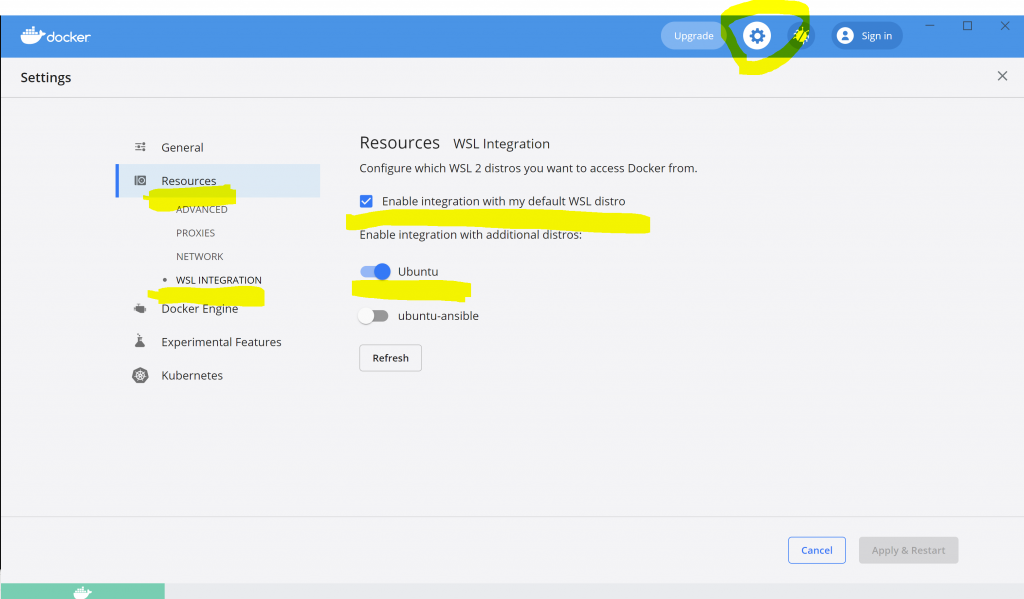
私の場合はデフォルトにしたいWSL名のUbuntuを一度削除して、再度WindowsStoreから入手したのでそのようなことになったのかと思います。